

This improvement on our existing report export feature allows engineers to download a CSV file containing all consumed BOM for any product.
The 2026 PICO product roadmap is packed with MES features that are designed to help promote clearer operator guidance, stronger error-proofing, and simpler configuration tools. These upgrades and new feature releases come straight from conversations with real PICO users, whose invaluable feedback helps us build features that cut the friction out of daily manufacturing work.
🔑 Key Takeaways from PICO's 2026 Product Roadmap
- Our new and upgraded features focus on error-proofing, traceability, and faster process setup for manufacturing teams.
- Quality notes now sync directly with QMS tools like Jira, closing the loop from the shop floor to engineering.
- No-code configuration makes it easier to add serial numbers, timers, and calculations without custom scripts.
- Torque tools are automatically blocked when calibration intervals are exceeded, preventing out-of-spec fastening.
- Multi-language work instructions improve clarity, onboarding speed, and consistency across global workforces.
- New reports, approvals, action grouping, and system integrations further reduce daily friction on the shop floor.
👉 Watch the full webinar hosted by Steve Wishau, Head of Product at PICO, to get a live look at these upcoming features.
A Preview of the MES Features Coming to PICO in 1H 2026
Below is a breakdown of the upgraded and new MES features coming to PICO in the new year. These features will be freely available to existing PICO users, but manufacturers testing out PICO's free digital work instructions will need to upgrade to gain access. Check out our Plans & Pricing to find a plan that works for you.
QMS Integration: Dynamic, Customizable Quality Notes
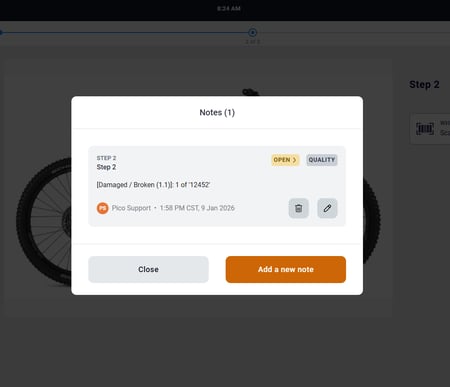
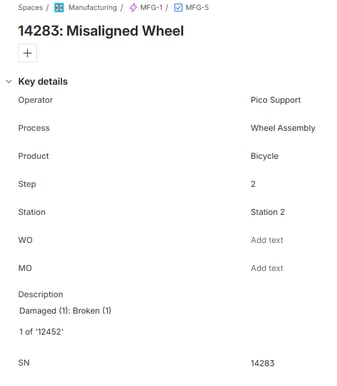
Quality notes are one of the most-used features in PICO—and now they’re more powerful than ever. By integrating with a Quality Management System (QMS) like Jira, operators building in PICO can leave richer, more structured quality notes as they work, with greater customization options. These notes most often address:
- Part defects detected during assembly that require review by the supervisor or quality engineer
- Non-conforming materials or components that need to be flagged for quality review
- Process inefficiencies or problems relating to the work instructions that need to be fixed
This upgrade maps notes from PICO to the QMS, automating problem escalation to the appropriate teams to help them react faster. Note status and build status are synced between the two systems, helping close the feedback loop from the shop floor to the engineering office.
No-Code Action Configuration: Streamlining Process Logic
Our users asked for easier ways to generate and add serial numbers, timers, and calculations to their processes—without the need for custom scripts. To make these functions more accessible while creating digital work instructions, they will be directly available in the action configuration wizard.
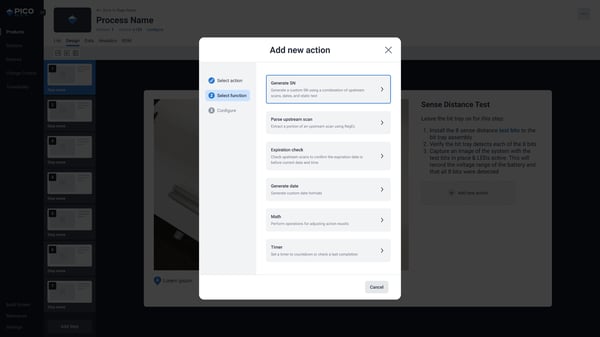
Engineers can generate serial numbers, run timers, or apply math logic with the same UI-based configuration they use to add manual and tool actions to their work instructions. This promotes faster process setup and deployment by reducing the steps needed to add backend functionality to your worker guidance.
Torque Tool Calibration: Built-In Preventative Maintenance
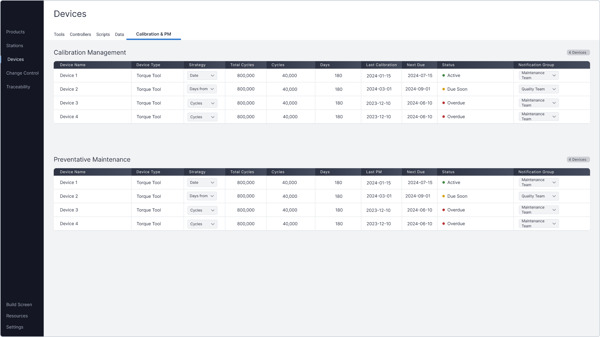
Mis-calibrated tools lead to bad builds. The new maintenance tracking feature in PICO helps manufacturers validate tool functionality based on pre-configured calibration dates or usage-based intervals.
If a tool reaches a defined date or number of rundowns, PICO will automatically block it— preventing out-of-spec fastening before it happens. Operators can monitor tool health in one place, eliminating guesswork, ensuring consistent tool performance, and enforcing stronger traceability tied to tool status.
➡️ See all no-code torque tool integrations available in our pre-integrated Device Library.
Multi-Language Support: Increasing Operator Accessibility
Manufacturers know that no matter how good their work instructions are, language barriers can lead to mistakes. Delivering multi-language worker guidance will now be possible in PICO through automatic translations—all at the click of a button.
Upon logging into PICO at their station, operators can select from a variety of languages, including English (UK), French (CA), French (FR), German, Spanish (MX), Spanish (ES), Vietnamese, Czech, Italian, Portuguese, and Polish.
Setting up translated work instructions is made as simple as possible on PICO's digital work instruction interface—engineers simply need to select a language, and their work instruction text, annotations, and actions are all instantly translated and catalogued in the system as separate from the original English (US) process. When modifications are made to the original text, all translated versions are flagged with a notification to include the updated text as well.
Multi-language support in PICO will benefit manufacturers by providing:
- Maximum clarity across all worker guidance
- Faster onboarding for non-English speaking operators
- Fewer interpretation errors
- Easier process changes — update once, publish everywhere
This new feature strengthens process reliability while improving user experience and accessibility for operators.

Additional Upgrades & Enhancements
Beyond the major features, several smaller—but highly requested—improvements will make daily work on the shop floor even smoother.
New System Integrations
PICO connects seamlessly to other manufacturing software systems to remove data siloes across the factory. We're excited to announce these new ERP, PLM, and quality ticketing system integrations in 2026:

FAQs about PICO's 2026 Product Roadmap
1. What kinds of MES features are included in PICO’s 2026 product roadmap?
The PICO 2026 roadmap includes feature categories for: quality management workflows, no-code process logic, torque tool maintenance and calibration enforcement, multi-language work instructions, traceability reporting, and new ERP/PLM/QMS integrations.
2. When will the new MES features from PICO’s 2026 product roadmap be released?
All features described in the PICO 2026 roadmap are planned for release in the first half of 2026 (1H 2026). To get release updates, subscribe to the PICO blog and follow PICO on our social media channels like LinkedIn, X, and YouTube.
3. How do I get updates, early access, or rollout help for the PICO’s 2026 product roadmap?
To request early access or rollout planning support for PICO’s 2026 product roadmap, schedule a call with our team.
Still have questions? Book a demo with our team.