#{ item.name }
#{ truncateText(item.metadescription) }

.png)
01.13.2026
Published by: Sarah Werner
Manufacturing KPI metrics are the foundation for understanding performance on the shop floor. From cycle time and throughput to OEE and first pass yield, these manufacturing KPIs help teams measure efficiency, quality, and capacity using real production data.
In practice, manufacturing KPIs are often misunderstood or inconsistently defined. Different teams calculate the same metric in different ways, or rely on delayed reports pulled from spreadsheets, discrete manufacturing systems, or legacy MES platforms.
This guide is designed to be an educational reference for manufacturing engineers, operations managers, and quality teams—offering plain-language definitions and simple formulas. All metrics listed are grounded in manufacturing data analytics captured in PICO, or through simple BI tool connectors.
A manufacturing KPI (Key Performance Indicator) is a measurable metric used to evaluate how effectively a manufacturing process is performing.
They answer questions like:
Strong manufacturing KPIs share three traits: they are based on real production events, consistently defined across teams, and available quickly enough to support decision-making on the shop floor. These traits are essential for effective manufacturing data analytics, not just reporting.
PICO tracks manufacturing KPIs by automatically capturing production data as work is performed through its Manufacturing Execution System (MES), recording every step of the build process in real time. As operators execute digital work instructions, PICO records timestamps, station states, and build status in real time. When integrated with smart tools and devices—such as torque tools, barcode scanners, vision systems, or testing equipment—PICO captures those results directly as part of the build record.
Manufacturing KPIs are then logged or calculated using PICO’s manufacturing data analytics features. Some KPIs, such as cycle time or downtime, are tracked directly. Others, such as first pass yield, efficiency, or OEE, are calculated from underlying time, throughput, and quality data.
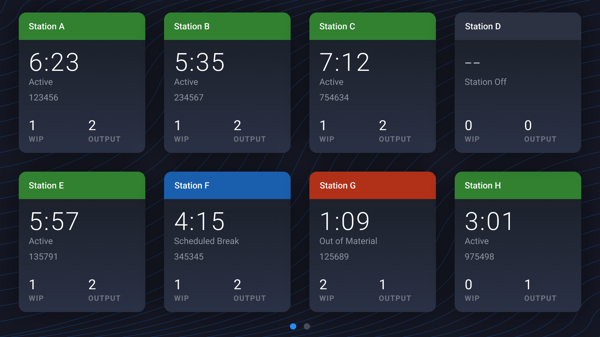 This PICO dashboard provides manufacturing engineers and shop floor supervisors a quick view of station status so they can easily monitor production from anywhere and respond to issues faster.
PICO integrates with other manufacturing software and business intelligence (BI) tools to enhance manufacturing KPI reporting and support unique operational requirements. This allows teams to combine shop-floor execution data with planning, inventory, and business metrics without manual data reconciliation. Learn more about manufacturing data analytics in this webinar focused on integrating MES and BI tools.
Below is a summary of the most common manufacturing KPIs tracked directly in PICO or calculated in connected systems using PICO build data and metadata.
What it measures: Time between builds at a station.
How it’s tracked: PICO automatically captures station status including idle time, paused states, and away time.
How it’s calculated: Sum of all qualified downtime events, expressed as a unit of time.
Why it matters: Reveals hidden waiting, material shortages, or staffing gaps.
What it measures: How much a station is expected to be available for production, expressed as a percentage of total planned production time (defined as total scheduled time minus planned downtime).
How it’s tracked: Defined production schedules and planned downtime are compared against actual station states captured in PICO.
How it’s calculated: (Total run time ÷ planned production time) x 100
Why it matters: Separates true downtime from planned non‑production time.
What it measures: How much a station is actually being used, expressed as a percentage.
How it’s calculated: (Actual time a station is productive ÷ total availability) x 100
Why it matters: Highlights bottlenecks, overstaffed stations, or equipment sitting unused.
What it measures: How many goods move through the shop floor.
How it’s tracked: Completed builds over time, by product, line, or station.
Why it matters: The simplest indicator of output—and a reality check against plans.
What it measures: How much of your theoretical maximum throughput you’re actually achieving.
How it’s tracked: Measures and records completed builds.
How it’s calculated: Actual throughput ÷ theoretical maximum throughput
Why it matters: Shows whether constraints are coming from demand, labor, or process inefficiency.
What it measures: The active build time of a process.
How PICO tracks it: Timestamped step execution through digital work instructions.
Why it matters: The foundation for nearly every other production KPI.
What it measures: The pace required to meet demand.
How it’s calculated: Available production time ÷ by customer demand
Why it matters: Helps align production with demand, optimize resource usage, and improve flow.
💡 What's the difference between cycle time and takt time, and why are both important? Read more about it in this blog.
What it measures: How close actual performance is to the target.
How it’s tracked: Records cycle time for every process.
How it’s calculated: Target time to make something ÷ actual time to make it (total cycle time)
Why it matters: Turns cycle time data into an easy‑to‑understand performance signal.
What it measures: Total time for a product to move through production.
How it’s calculated: Total cycle time of all processes + downtime between stations
Why it matters: Connects shop‑floor reality to customer delivery commitments.
What it measures: Time required to complete setup or changeover.
How it’s tracked: Setup and changeover processes are defined as structured workflows in PICO and timed automatically.
Why it matters: Critical for high‑mix, low‑volume environments.
What it measures: How many builds pass without rework, expressed as a percentage of total builds.
How it’s calculated: (Number of builds completed without rework ÷ total builds) x 100
Why it matters: A direct indicator of process quality and error‑proofing effectiveness.
What it measures: How many builds were scrapped over a specified time range, expressed as a percentage of the total builds.
How it’s tracked: Builds are marked as scrapped and logged in an analytics dashboard.
How it’s calculated: (Number of scrapped builds ÷ total builds) x 100
Why it matters: Directly ties quality losses to time, stations, and processes.
💡 A battery manufacturer leveraged PICO data to reduce their scrap rate to zero during prototyping. See the full customer story.
What it measures: Average time between process anomalies such as torque failures, inspection failures, or validation blocks.
How PICO tracks it: Every failed tool action, quality check, or validation automatically gets logged in the build data table.
How it’s calculated: Total production time ÷ number of anomaly events
Why it matters: Shows whether improvements are actually reducing disruptions.
What it measures: How often processes or quality checks occurred outside of regulatory compliance rules.
How it’s tracked: Incomplete processes or failed quality checks are logged in PICO. Non-compliance events can be measured by a specified unit of time (e.g. non-compliance events per year).
Why it matters: Essential for audits, corrective actions, and regulated environments.
What it measures: Differences between the planned BOM and what was actually used.
How it’s tracked: Substitutions or missing parts get recorded in PICO.
Why it matters: Improves cost control, traceability, and engineering feedback loops.
What it measures: How well a station or process performs overall.
How it’s tracked: All underlying data—availability, cycle time, downtime, quality events—is captured natively.
How it’s calculated: Availability x Performance x Quality, where Performance compares actual cycle times to ideal cycle times, and Quality compares the number of "good" units to the total units produced.
Why it matters: A composite metric that leadership already understands.
Most systems tell you what happened. PICO shows you why it happened—because every KPI is tied back to:
This is how PICO makes manufacturing KPIs usable on the floor, not just in a report.
You don’t need a data science team or a year‑long MES rollout to get meaningful manufacturing KPIs.
With PICO, you can:
✅ Start with as little as one station
✅ Automate data capture and implement traceability
✅ See real-time analytics in pre-configured dashboards
✅ Scale dashboards and reporting to track the manufacturing KPIs that matter most
For more advanced analytics and dashboarding capabilities, PICO seamlessly connects with BI tools such as Power BI and Tableau. Join our upcoming manufacturing data analytics webinar to learn more about integrating PICO with BI tools for deeper analytics and actionable production insights.
Bring your shop floor together — people, tools, and data all connected in one system. No rip and replace; just connections.