#{ item.name }
#{ truncateText(item.metadescription) }

02.19.2026
Published by: Sarah Werner
Yet in many manufacturing environments, the moment a defect is discovered is disconnected from the systems used to track, manage, and resolve it. Operators are asked to write notes on paper, flag a supervisor, or “log it later” in a separate quality or ticketing system. By the time a ticket or nonconformance report is created, critical context captured at the time of manufacturing execution is already missing.
By integrating with quality ticketing and Quality Management Systems (QMS) like Jira by Atlassian, PICO enables real-time shop floor quality escalation with full manufacturing context—without slowing operators down or forcing them to leave their workflow.
This article explores how quality ticketing is automated, what information is shared between PICO and Jira, and why integrating the shop floor with manufacturing QMS is critical to address quality issues quickly and efficiently.
 🎉 New Features Coming to PICO in 2026!
The integration with Jira and automated quality ticketing feature are part of PICO's 2026 Product Roadmap.
👉 See the full list of features being released this year!
For some manufacturers, quality issues on the shop floor are still communicated the old-fashioned way—handwritten notes, emails, hallway conversations, or a message passed along at the end of a shift. Even when issues are documented, they’re often disconnected from the systems responsible for tracking, prioritizing, and resolving them.
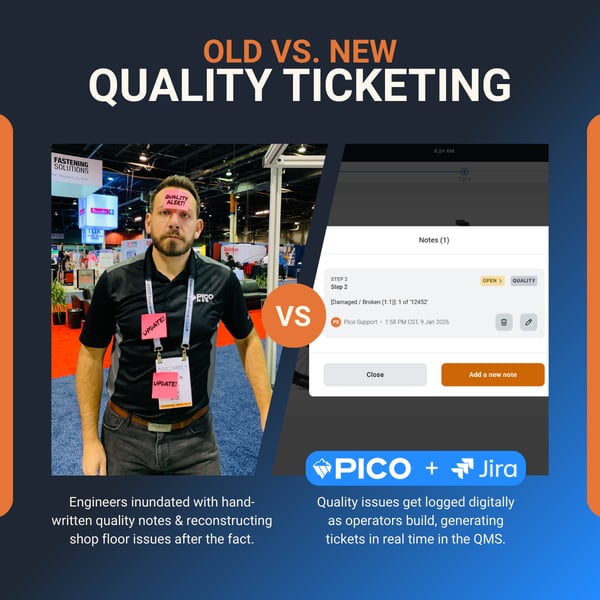
For other manufacturers, especially those that have begun digitizing their factories, quality notes may be managed in shop floor systems like PICO, where quality issues are digitally flagged during the build process. But too often, those notes stopped there. They captured what happened, without ensuring the issue was logged, tracked, or acted on.
That gap is what drove PICO’s integration with Jira. By connecting quality feedback captured directly within digital work instructions to an external QMS, PICO turns shop floor observations into automated quality tickets—ensuring every issue raised by an operator becomes visible, traceable, and actionable. Instead of notes getting lost, quality teams get structured data and real workflows to drive resolution.
Many manufacturers use Jira as part of their QMS stack to manage nonconformances, deviations, and quality investigations. But quality ticketing systems often sit several steps removed from where quality issues actually occur.
Common challenges include:
Without tight integration with manufacturing QMS, quality teams are left piecing together information after the fact—rather than responding in real time.
PICO approaches quality feedback differently by embedding it directly into the digital work instructions that operators interact with on the shop floor.
When an operator encounters a defect, nonconformance, or deviation, they can create a quality note directly within PICO—without stopping the build or leaving the process step they’re working on.
Using predefined quality codes and guided inputs, operators can quickly indicate the type of quality issue, which part is damaged, missing, or out of spec, and where in the process the issue occurred.
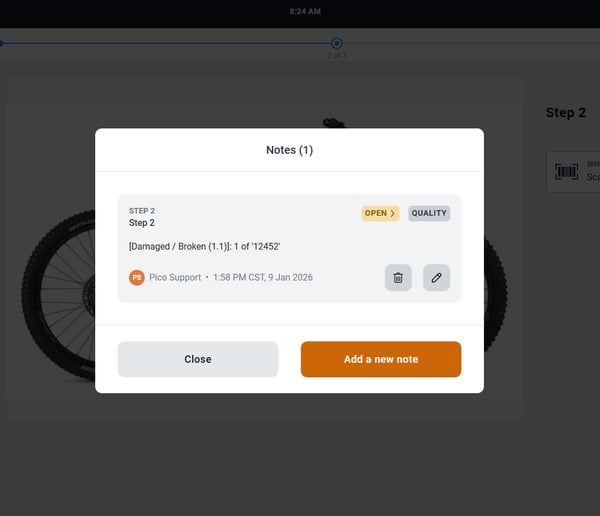
This approach makes digital work instructions a natural point for quality feedback, rather than an afterthought.
▶️ Watch a quick demo on how quality tickets get created in PICO and pushed to Jira.
One of the biggest advantages of capturing quality issues at the point of execution is context. When a quality note is created in PICO, the system automatically logs key manufacturing data, including:
This removes the burden from operators to manually document details—and ensures quality tickets are complete, consistent, and traceable.
Once a quality note is submitted in PICO, it’s pushed directly into Jira as a new issue, aligned to the appropriate Jira Epic (for example, a manufacturing or quality Epic). Each ticket is mapped to automatically populate the data captured and logged in PICO, including the description of the quality issue, the part's serial number, associated material, and all metadata (operator, station, process, and timestamp).
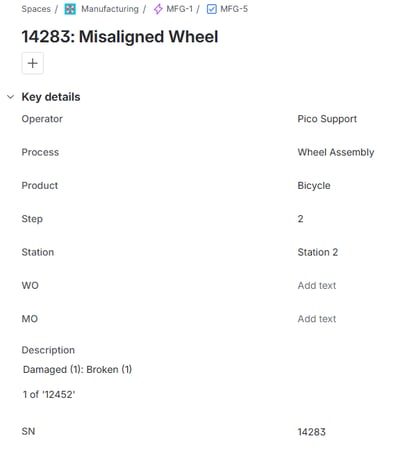
This one-way push ensures Jira remains the system of record for quality tracking, while PICO serves as the point of capture on the shop floor. No duplicate entry. No missing details.
From here, Quality Engineers can be assigned to investigate and resolve the issue.
Instead of asking operators to remember to create tickets later—or relying on supervisors to translate shop floor issues into Jira—quality data flows automatically from execution to resolution.
This creates:
✅ Faster response times
✅ Better visibility for quality and engineering teams
✅ Stronger traceability between defects and affected products
✅ Cleaner data for continuous improvement
💡 See how Lithos Energy leveraged PICO's automated data collection and traceability to build a foundation for their QMS.
By integrating MES and manufacturing QMS for automated quality ticketing, PICO ensures that quality feedback is timely, contextual, and actionable—right from the shop floor.
If you’re looking to improve quality escalation, reduce friction for operators, and strengthen your QMS integration strategy, embedding quality feedback into execution is a powerful place to start.
👉 Book a demo with our team to see how PICO can streamline your quality workflows.
1. Can PICO integrate with other QMS/quality ticketing systems besides Jira?
Yes. PICO is designed to sit at the center of the manufacturing execution experience—connecting operators, processes, and tools with the enterprise systems teams already rely on.
2. Do operators need to leave PICO to create a Jira ticket?
No. Operators can create quality notes directly within PICO while following their digital work instructions. The Jira ticket is generated automatically in the background, without requiring the operator to switch systems or stop their workflow.
3. What information is automatically included in a Jira quality ticket?
Each Jira ticket includes rich shop floor context captured by PICO, such as the serial number, station, process step, operator, timestamp, and any associated work or manufacturing order—eliminating manual data entry and missing details.
4. Can we control when a quality issue stops the build versus being logged for later?
Yes. Teams can configure whether a quality issue immediately stops the build for containment or is logged as a flag that must be addressed before the product leaves the facility. This allows flexibility based on severity and process requirements.
5. Does this replace our existing QMS or Jira workflows?
No. PICO complements existing QMS and Jira workflows by acting as the point of capture on the shop floor. Jira remains the system of record for quality tracking, while PICO ensures issues are reported with complete and accurate context.
Bring your shop floor together — people, tools, and data all connected in one system. No rip and replace; just connections.