#{ item.name }
#{ truncateText(item.metadescription) }

04.13.2026
Published by: Sarah Werner
Manufacturers are increasingly looking for ways to build smarter, more automated processes—without adding complexity or relying on custom code.
That’s where no-code manufacturing comes in. Instead of scripting logic behind the scenes, common functions that help generate, parse, validate, or calculate data are built directly into their digital work instruction tool, making processes easier to build, maintain, and scale.
In PICO, this concept comes to life in the action configuration menu in the digital work instruction feature—allowing manufacturers to automate data handling as operators build, all without writing a single line of code.
This article explores the benefits of built-in process logic, and 6 common functions manufacturers rely on the most when creating digital work instructions.
 🎉 New Features Coming to PICO in 2026!
The process logic feature is part of PICO's 2026 Product Roadmap.
👉 See the full list of features being released this year!
Process logic refers to a set of rules and functions used to manipulate production data in a way that is most helpful to the manufacturer. For example, a data parser can be used to extract portions of a serial number using a RegEx pattern. This is particularly relevant in assembly manufacturing environments where dozens or even hundreds of serial numbers get logged as parts and subassemblies move down the production line.
Without embedded logic in manufacturing work instructions, operators may be asked to:
Including logic functions in digital work instructions removes the cognitive burden that comes with data manipulation. For operators, the focus should be on building—not formatting data for final output or performing basic math. Moreover, automating these functions saves time and error-proofs production outputs.
▶️ Watch the demo video to see how to add no-code process logic to PICO work instructions.
Each of these functions are available as no-code actions in PICO's Action Configuration wizard as part of the digital work instructions tool.
1. Serial Number Generation
Automatically generate a custom serial number based on pre-defined formats or rules involving a combination of upstream scans, dates, and static text. This is helpful when assigning serial numbers at the point of build without relying on external systems or manual entry.
2. Upstream Data Parser
Instantly extract a portion of data captured earlier in the process using RegEx patterns. This is commonly used to avoid re-entry of part serial numbers scanned upstream.
3. Expiration Checks
Validate whether a date or time threshold has been exceeded. This can be used to ensure materials, adhesives, or components are still within allowable usage windows before installation.
4. Date Generation
Create a timestamp in custom date formats. This helps with labeling, traceability records, or associating build events with precise production dates.
5. Mathematical Calculations
Perform basic calculations or apply complex formulas on operator inputs or tool action results. Calculate tolerances, offsets, derived values, and more, ensuring resulting data is in the desired format.
6. Timers
Track elapsed time between steps or actions. Enforce dwell times, cure times, or minimum wait periods during assembly.
In PICO, digital work instructions are built step by step using an action-based configuration model.
When creating a step, users select from a set of available actions—such as scans, measurements, torques, pass/fail validations, or prints—to guide the operator through the process. Most actions rely on a connected device, which are added and configured in the no-code Device Library.
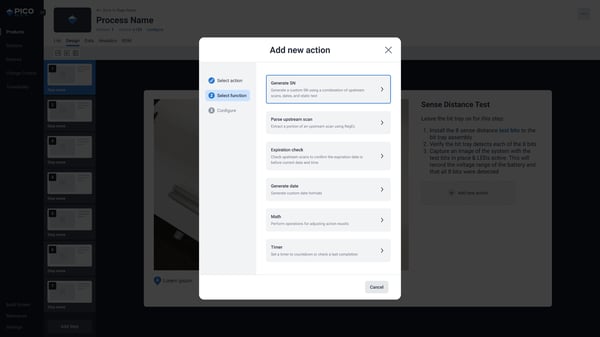
Process logic functions are a part of the same action selection experience directly within the digital work instruction platform.
This means:
The result is a more intuitive, no-code manufacturing experience where data configuration lives directly inside the work instruction itself and happens in parallel with data collection.
These process logic functions aren’t entirely new—they’ve long existed in PICO as scripts within the Device Library. What’s changed is where and how they’re configured.
By making these capabilities available directly in the digital work instruction tool, PICO makes process logic:
The result is a more approachable no-code manufacturing workflow: Smarter instructions, embedded logic, and greater flexibility for manufacturing engineers—without adding complexity or requiring software coding resources.
👉 Book a demo with our team to learn more about process configuration in PICO.
1. Do I need any programming or developer experience to use these process logic functions?
No. All six process logic functions are now fully configurable through PICO’s no-code action configuration wizard. Manufacturing engineers can add, configure, and modify logic directly within digital work instructions—without writing or maintaining scripts.
2. How is this different from using logic in traditional MES or custom scripts?
Traditional MES logic often lives in backend scripts or requires engineering support to update. With PICO, logic is embedded directly into the work instruction step itself, making it easier to configure, easier to maintain, and faster to adapt as processes change—without slowing production or introducing risk.
3. Can these process logic actions be reused or updated across multiple work instructions?
Yes. Because these logic functions are configured as actions within PICO, they can be reused, adjusted, or standardized across different work instructions and products. Updates can be made centrally and applied consistently, helping teams maintain control while scaling no-code manufacturing workflows. Check out PICO's Templates & Variants feature to learn about managing work instructions in high-mix environments and how to make batch updates to several linked processes.
Bring your shop floor together — people, tools, and data all connected in one system. No rip and replace; just connections.